After training a model in Amazon SageMaker, the next question is how to actually use it. This is where many people get stuck.
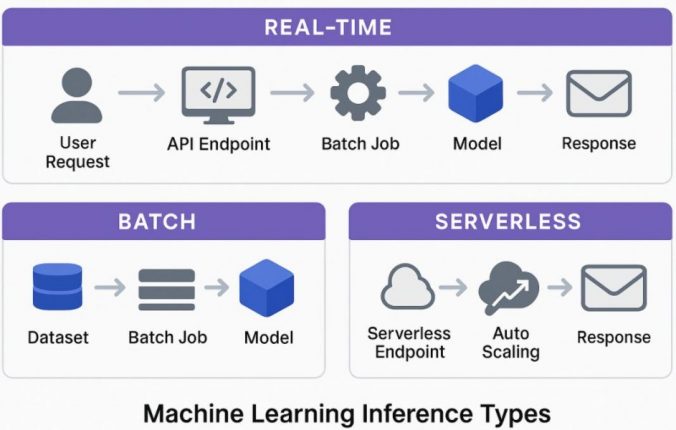
SageMaker offers multiple ways to run inference, and it’s not always obvious which one to choose. In this guide, I’ll explain the differences between real-time, batch, and serverless inference using simple examples.
Table of Contents
- What is Inference in SageMaker?
- Real-Time Inference
- Batch Inference
- Serverless Inference
- Real-Time vs Batch vs Serverless
- When to Use Each (Quick Summary)
- How to choose
- Common mistakes
- Final thoughts
- FAQ
What is Inference in SageMaker?
In Amazon SageMaker, inference is the step where a trained model is used to make predictions on new data.
Once your model is trained, inference is how it becomes useful in a real system. Depending on your use case, SageMaker gives you different ways to run those predictions.
The three main options are:
- Real-time inference
- Batch inference
- Serverless inference
They all do the same job, but in different ways.
If you haven’t trained a model yet, see how I built one using SageMaker Canvas.
Real-Time Inference

What it is
Real-time inference means deploying your model as an API endpoint.
You send a request with input data and receive a prediction almost immediately.
When to use it
Use real-time inference when:
- A user or system is waiting for a response
- You need low latency (fast predictions)
- The model is part of a live application
Example:
A loan approval system where a user submits information and expects a result within seconds.
Basic example
aws sagemaker create-endpoint --endpoint-name loan-model-endpoint --endpoint-config-name loan-config
In my case, I used real-time inference for a loan prediction model where users needed instant results, which made latency more important than cost.
Things to keep in mind
- Endpoints run continuously, which can increase cost
- You need to choose the right instance size
- Not ideal for low or irregular traffic
Key idea
Use real-time inference when fast responses are important.
Batch Inference

What it is
Batch inference processes a large amount of data at once.
Instead of sending individual requests, you provide a dataset (usually in S3), and SageMaker runs a job to generate predictions for all records.
When to use it
Use batch inference when:
- You are working with large datasets
- Real-time responses are not needed
- Predictions can run on a schedule
Example:
Generating predictions for all users every night.
Basic example
aws sagemaker create-transform-job --transform-job-name batch-job --model-name loan-model --input-data-config file://input.json --output-data-config file://output.json
For batch inference, I used it to process historical data where results were not time-sensitive.
Things to keep in mind
- Input format must match the model
- Jobs take time depending on data size
- Not suitable for live applications
Key idea
Use batch inference when processing large datasets efficiently is the goal.
This step depends heavily on how your model was trained and evaluated, especially the data format and output structure.
Serverless Inference

What it is
Serverless inference works like real-time inference but without managing servers.
SageMaker automatically scales resources based on incoming requests.
When to use it
Use serverless inference when:
- Traffic is low or unpredictable
- You want a simpler setup
- You prefer a pay-per-use model
Example:
An internal tool that is used occasionally.
Basic example
from sagemaker.serverless import ServerlessInferenceConfig
serverless_config = ServerlessInferenceConfig(
    memory_size_in_mb=2048,
    max_concurrency=5
)
Things to keep in mind
- There can be cold start delays
- Memory and concurrency need tuning
- Not ideal for steady high traffic
Key idea
Use serverless inference when usage is variable and simplicity matters.
Real-Time vs Batch vs Serverless
Choosing between SageMaker real-time, batch, and serverless inference depends on latency requirements, cost considerations, and traffic patterns.
| Feature | Real-Time | Batch | Serverless |
|---|---|---|---|
| Response time | Immediate | Delayed | Near real-time |
| Cost model | Always running | Per job | Per request |
| Best use case | APIs | Large datasets | Low traffic apps |
When to Use Each (Quick Summary)
- Use real-time inference for applications that require immediate responses
- Use batch inference for processing large datasets on a schedule
- Use serverless inference when traffic is low or unpredictable
How to choose
A simple way to decide:
- If users are waiting then use real-time
- If processing large data then use batch
- If traffic is unpredictable then use serverless
Common mistakes
- Using real-time endpoints for low traffic (unnecessary cost)
- Trying to use batch inference for real-time needs
- Not considering cost differences between options
- Ignoring cold start behavior in serverless
Final thoughts
All three approaches are useful, but they are meant for different situations. Choosing the right one depends on your use case, not just what seems easier to set up. Once you understand the differences, it becomes much easier to design the right system.
Real-time inference provides the lowest latency but requires always-running instances, which increases cost. Serverless inference reduces cost by scaling automatically, but may introduce cold start delays. Batch inference is usually the most cost-efficient option for large datasets but is not suitable for real-time use cases.
FAQ
What is SageMaker inference?
It is the process of using a trained model to generate predictions on new data.
When should I use real-time inference?
When fast responses are required, especially in user-facing applications.
Is serverless inference cheaper?
It is usually cheaper for low or unpredictable traffic, but not for constant usage.
